Control Arrays
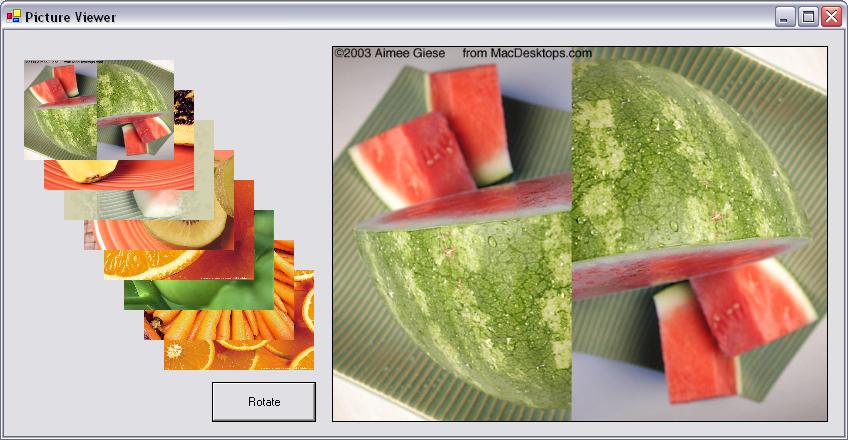
Here is the code for an example program that looks like this:
Clicking on one of the pictures on the left moves it into the bigger box on the right. Clicking the rotate button moves all the images on the left up one box.
The code shows you how to work with images and how to create an array of controls/widgets/objects This example creates an array of picture boxes, but it could easily be labels, textboxes, buttons, or another type of control.
 |
Download the code by clicking on the Zip file. |
Instructions for Creating the Example:
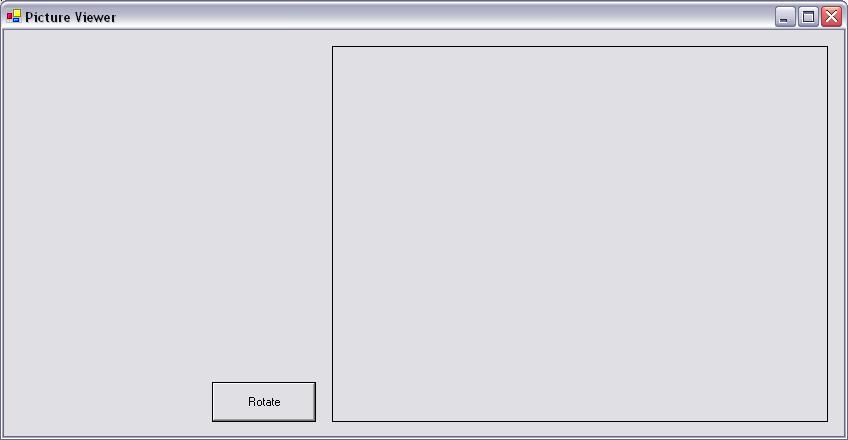
The Form is called Form1. Change it's Text property to Picture Viewer. There is one picture box on the right named picBoxBig. Change it's BorderStyle property to FixedSingle so that we can see the border. The button on the left is named button1. Change it's Text property to Rotate.
private System.Windows.Forms.PictureBox[] PicBoxes;
PicBoxes = new System.Windows.Forms.PictureBox[8];
		private void Form1_Load(object sender, System.EventArgs e)

		{

			int i;

			//initialise each picture box

			for(i=0; i<8; i++)

			{

				//allocate the picture box

				PicBoxes[i] = new PictureBox();

				//set up the initial properties

				PicBoxes[i].Top = (i+1)*30;

				PicBoxes[i].Left = (i+1)*20;

				PicBoxes[i].Width = 150;

				PicBoxes[i].Height = 100;

				PicBoxes[i].SizeMode = PictureBoxSizeMode.StretchImage;

				//This line gets the image for the picture box from a file

				//Directory.GetCurrentDirectory returns the pathname the application is currently running in.

				//This ia relative pathname - so you don't have to change your code when you move your program

				//it is VERY IMPORTANT that you use relative pathnames in your project, or it will not run in the demo!

				PicBoxes[i].Image = Image.FromFile(Directory.GetCurrentDirectory() + @"\pictures" + @"\" + (i+1) + ".jpg");

				//we are putting the index into the Tag property so we can access this like any other array

				PicBoxes[i].Tag = i;

				//Here we are wiring this picture boxes click to our new common click handler.

				PicBoxes[i].Click += new System.EventHandler(ClickHandler);

			}
			this.Controls.AddRange(PicBoxes);

		}
		//This is the new click handling function for our array of boxes

		public void ClickHandler(Object sender, System.EventArgs e)

		{

			//when a pic box is clicked on, we copy its image over to the bigger pic box.

			//we have to use the .Tag property to get to the Image property.

			picBoxBig.Image = PicBoxes[(int)((System.Windows.Forms.PictureBox) sender).Tag].Image;

		}
		//This function rotates all the images up one spot when it is called.

		//It uses a temp image (that does not show up anywhere on the form)

		// to hold the "extra" image during the rotation.

		private void button1_Click(object sender, System.EventArgs e)

		{

			int i;

			Image temp;

			//copy the top image into temp.

            		temp = PicBoxes[0].Image;

			//rotate the images

			for(i=0; i<7; i++)

			{

				PicBoxes[i].Image = PicBoxes[i+1].Image;

			}

			//copy temp into the bottom image.

			PicBoxes[7].Image = temp;

		}