Dynamic Queries - Example
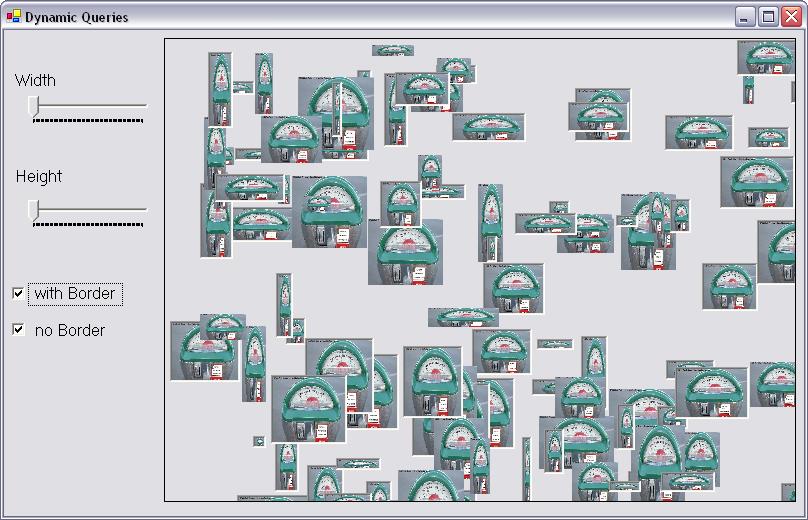
These instructions will build an example program that looks like this:
The form will automatically load 100 copies of the same picture varying in the size and border style. You can perform a dynamic query with the filters on the left side of the window. Dynamic queries provide continuous updating of results - the results are shown immediately as you change the search criteria!
 |
Download the code by clicking on the Zip file. |
Instructions for Creating the Example:
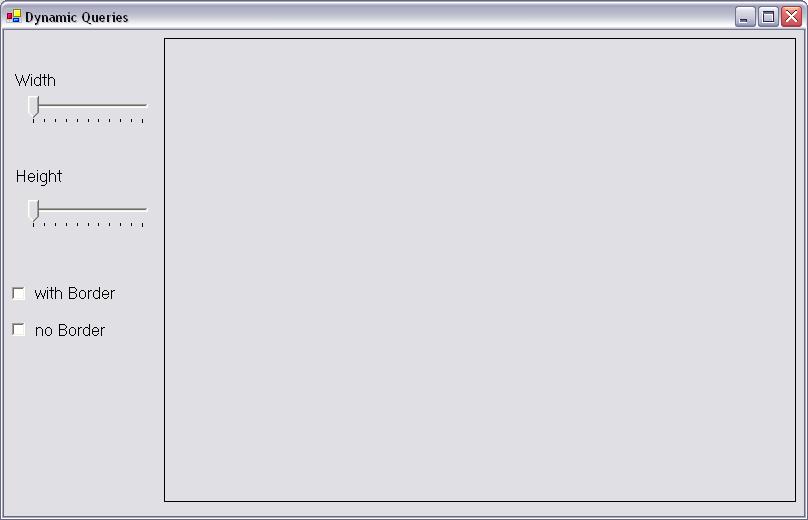
The track bars are called trkWidth and trkHeight. The checkboxes are called chkBorder and chkNoBorder. The rectangle on the right is a panel called Panel1. It will contain all of our pictureboxes, which will be loaded at runtime. Set the minimum value of each trackbar to 0, and the maximum to 85.
5. Add a reference to System.IO at the top of your code.
6. Declare an array of picture boxes with no size at the top of your code window:
' create an array of
picture boxes
private System.Windows.Forms.PictureBox[]
PicBoxes;
7. Add the following code to a Form1_Load event to create each picture box and position it in the panel. We also set up the two checkboxes so that every picture is displayed to start, and hook up all the change events on our components to a single Query function. This means that every time we change a parameter, the query function will be automatically called.
int i;
System.Random rand;
rand = new System.Random();
//allocate our array of picture boxes
PicBoxes = new System.Windows.Forms.PictureBox[100];
//initialise each picture box
for(i=0; i<100; i++)
{
//allocate the picture box
PicBoxes[i] = new PictureBox();
//set up the initial properties - these are assigned
from a random number generator
PicBoxes[i].Top = (int)rand.Next(1, panel1.Height);
PicBoxes[i].Left = (int)rand.Next(1, panel1.Width);
PicBoxes[i].Width = (int)rand.Next(10, 80);
PicBoxes[i].Height = (int)rand.Next(10, 80);
PicBoxes[i].SizeMode = PictureBoxSizeMode.StretchImage;
//This line gets the image for the picture box from
a file
//Directory.GetCurrentDirectory returns the pathname the application is
currently running in.
PicBoxes[i].Image = Image.FromFile(Directory.GetCurrentDirectory() +
@"\pic.jpg");
//we are putting the index into the Tag property so
we can access this like any other array
PicBoxes[i].Tag = i;
if((int)rand.Next(0,3)==1)
{
PicBoxes[i].BorderStyle = System.Windows.Forms.BorderStyle.None;
}
else
{
PicBoxes[i].BorderStyle = System.Windows.Forms.BorderStyle.Fixed3D;
}
}
this.panel1.Controls.AddRange(PicBoxes);
//set initial values - start with
all pictures visible
chkBorder.Checked = true;
chkNoBorder.Checked = true;
trkWidth.Value = 0;
trkHeight.Value = 0;
//hook up events to our query function so that it fires any time one of these events goes
chkBorder.CheckedChanged += new System.EventHandler(Query);
chkNoBorder.CheckedChanged += new System.EventHandler(Query);
trkWidth.Scroll += new System.EventHandler(Query);
trkHeight.Scroll += new System.EventHandler(Query);
8. Create a sub routine to handle the dynamic query. This function is the one we hooked up to our four change events, so every time we change any of our search parameters, the results will update right away.
		//This is the function that will redo our query every time something changes

		public void Query(Object sender, System.EventArgs e)

		{

			int i;

			for(i=0; i<100; i++)

			{
				//check the height and width first

				if (PicBoxes[i].Height > trkHeight.Value && PicBoxes[i].Width > trkWidth.Value)

				{
					//then check the border property

					if ((chkBorder.Checked == true && PicBoxes[i].BorderStyle == System.Windows.Forms.BorderStyle.Fixed3D) || (chkNoBorder.Checked == true && PicBoxes[i].BorderStyle == System.Windows.Forms.BorderStyle.None))

					{

						PicBoxes[i].Visible = true;

					}

					else

					{

						PicBoxes[i].Visible = false;

					}

				}

				else

				{

					PicBoxes[i].Visible = false;

				}

			}


		}//end query