Toasting (like MSN Messenger)
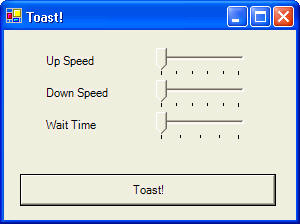
Here is the code for an example program that looks like this:
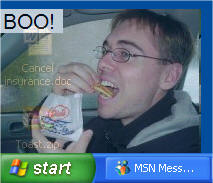
Form1 contains options for adjusting the speed of the toast. Form2 pops up like a piece of toast when you click the Toast! button. Form2 appears semi-transparent over top of other windows and the desktop background.
 |
Download the code by clicking on the Zip file. |
Form1 contains 3 timers that animate the toasting of Form2. Form2 contains a BackgroundPicture that appears semi-transparent when the form is toasted. Check out the example code to see the details of this.
The following code was added to Form1:
// create a second form
private Form2 f2;
// the screen location for the toast to go up to
private int top;
// the screen location for the toast to start at
private int bottom;
private void Form1_Load(object sender,
System.EventArgs e)
{
// set the timers to an initial value
tmrUp.Interval = trkUp.Value;
tmrDown.Interval = trkDown.Value;
tmrWait.Interval = trkWait.Value;
// load up the second form (the toast!)
f2 = new Form2();
// make the second form transparent
f2.Opacity = 0.8;
f2.TransparencyKey = f2.BackColor;
// make it on
transparent over all other windows
f2.TopMost
= true;
// set some properties about the form to make it non-standard
f2.ShowInTaskbar = false;
f2.FormBorderStyle = FormBorderStyle.None;
// the screen location for the toast to go up to
top = 600;
// the screen location for the toast to start at
bottom = top + f2.Height;
}
private void button1_Click(object sender,
System.EventArgs e)
{
// perform the toast
// show the toasting form
f2.Show();
// position the toasting form in the bottom left corner
f2.Left = 0;
f2.Top = bottom;
// start the animation
tmrUp.Enabled = true;
}
private void trkUp_Scroll(object sender, System.EventArgs e)
{
tmrUp.Interval = trkUp.Value;
}
private void trkDown_Scroll(object sender, System.EventArgs e)
{
tmrDown.Interval = trkDown.Value;
}
private void trkWait_Scroll(object sender, System.EventArgs e)
{
tmrWait.Interval = trkWait.Value;
}
private void tmrUp_Tick(object sender, System.EventArgs e)
{
// move the form up to show it
f2.Top = f2.Top - 10;
if (f2.Top <= top)
{
tmrUp.Enabled = false;
tmrWait.Enabled = true;
}
}
private void tmrDown_Tick(object sender, System.EventArgs e)
{
// move the form back down to hide
f2.Top = f2.Top + 10;
if (f2.Top >= bottom)
tmrDown.Enabled = false;
}
private void tmrWait_Tick(object sender, System.EventArgs e)
{
// let the form wait before it goes back down
tmrWait.Enabled = false;
tmrDown.Enabled = true;
}