Control Arrays
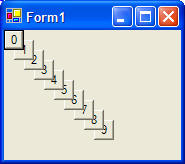
Here is the code for an example program that looks like this:
You can create an array of controls/widgets/objects. This example creates an array of buttons, but it could easily be labels, textboxes, picture boxes, or another type of control.
 |
Download the code by clicking on the Zip file. |
Public Class Form1
Inherits System.Windows.Forms.Form
' create an array of buttons
Dim c() As Button
Private Sub Form1_Load(ByVal sender As System.Object, ByVal e
As System.EventArgs) Handles MyBase.Load
Dim i As Integer
' resize the
array of buttons
ReDim c(10)
' set the properties for each button
in the array
For i = 0 To 9
' allocate the button
c(i) = New
System.Windows.Forms.Button()
With c(i)
.Text = i
.Size = New Size(20, 20)
.Location = New Point(i * 10, i * 10)
' store the index value for this button
in the array c
.Tag = i
' wire this button's click event to a common click sub routine
AddHandler .Click, AddressOf Me.btnArrayClick
End With
Next
' add the control
array to the form
Me.Controls.AddRange(c)
End Sub
Private Sub btnArrayClick(ByVal sender As System.Object,
ByVal e As EventArgs)
' see which
button was clicked, check out its index in the array
MsgBox(sender.Text & " index=" &
sender.Tag)
End Sub
End Class