Dynamic Queries Example
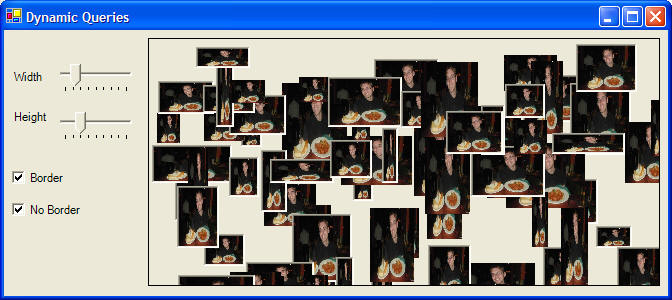
These instructions will build an example program that looks like this:
The form will automatically load 100 copies of the same picture varying in the size and border style. You can perform a dynamic query with the filters on the left side of the window. Dynamic queries provide continuous updating of results - the results are shown as you change the search criteria!
 |
Download the code by clicking on the Zip file. |
Instructions for Creating the Example:
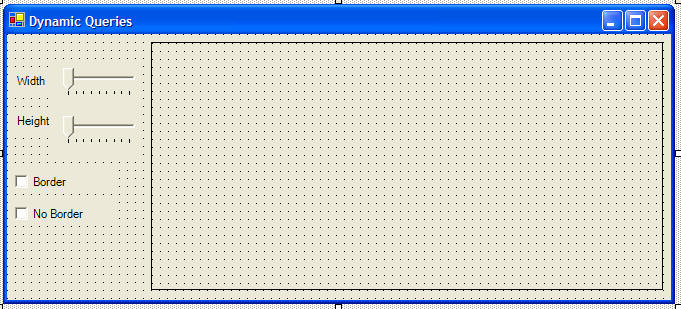
The track bars are called trkWidth and trkHeight. The checkboxes are called chkBorder and chkNoBorder. The rectangle on the right is a panel called Panel1. It will contain all of our pictureboxes, which will be loaded at runtime.
5. Declare an array of picture boxes with no size at the top of your code window:
' create an array of
picture boxes
Dim pics() As PictureBox
6. Add the following code to a Form1_Load event to create each picture box
and position it in the panel:
Private Sub Form1_Load(ByVal sender As System.Object, ByVal e As
System.EventArgs) Handles MyBase.Load
Dim i As Integer
' resize our picture box to include 100
picture boxes
ReDim pics(100)
' set the properties for each of our
picture boxes
For i = 0 To 99
' allocate memory
for the picture box
pics(i) = New PictureBox()
With pics(i)
'put the same picture in each picture box
.Image =
Image.FromFile("pic1.jpg")
' set it so the picture will resize depending on the size of the picture box
.SizeMode =
PictureBoxSizeMode.StretchImage
' pick a random size between 1 and 80 pixels wide and tall
.Size = New
Size(Int(80 * Rnd() + 1), Int(80 * Rnd() + 1))
' pick a random location with the panel
.Location =
New Point(Int(Panel1.Width * Rnd() + 1), Int(Panel1.Height * Rnd() + 1))
' store the index in the array
.Tag = i
' choose to
use a border or no border
If Int(2 *
Rnd() + 1) = 1 Then
.BorderStyle = BorderStyle.Fixed3D
Else
.BorderStyle = BorderStyle.None
End If
End With
Next
' add the picture boxes to the panel
Me.Panel1.Controls.AddRange(pics)
' start with all the pictures visible
chkBorder.Checked = True
chkNoBorder.Checked = True
End Sub
7. Create a sub routine to handle the dynamic query. Use the handles statement to link each of our search filter controls to the sub routine so that when the search criteria is changed the Query sub routine will fire.
Private Sub Query(ByVal sender As System.Object, ByVal e As System.EventArgs)
Handles trkWidth.Scroll, trkHeight.Scroll, chkBorder.CheckedChanged,
chkNoBorder.CheckedChanged
' this subroutines handles all query
controls - when each control is changed the query runs
' the dynamic query
' check all pictures to see if they match the search criteria
Dim i As Integer
For i = 0 To 99
' check the
width and height, if the picture isn't bigger, go to the else
If pics(i).Height > trkHeight.Value
And pics(i).Width > trkWidth.Value Then
' check the border of the picture, if it doesn't
match the checkboxes, go to the else
If (chkBorder.Checked
= True And pics(i).BorderStyle = BorderStyle.Fixed3D) Or _
(chkNoBorder.Checked = True And pics(i).BorderStyle = BorderStyle.None) Then
' picture matches the critera, show it
pics(i).Visible = True
Else
' picture doesn't match criteria, hide it
pics(i).Visible = False
End If
Else
' picture doesn't match criteria, hide it
pics(i).Visible = False
End If
Next
End Sub