Using GDI+ to Draw Graphics
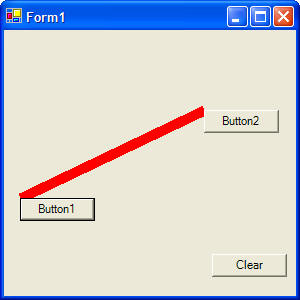
Here is the code for an example program that looks like this:
The program uses GDI+ to draw a line between two buttons. There are many other drawing methods you can also call.
 |
Download the code by clicking on the Zip file. |
Public Class Form1
Inherits System.Windows.Forms.Form
Private Sub Button1_Click(ByVal sender As System.Object, ByVal e As
System.EventArgs) Handles Button1.Click
' create a graphics object
Dim g As Graphics
' instantiate the graphics object, Me = the current form so
it will draw on the form
g = Me.CreateGraphics()
' create a pen to draw with
Dim p As Pen
' instantiate the pen, set the color and width
p = New Pen(Color.Red, 10)
' draw a line, check out the other drawing functions by just
typing g. and looking at the menu
g.DrawLine(p, Button1.Left, Button1.Top, Button2.Left,
Button2.Top)
End Sub
Private Sub Button2_Click(ByVal sender As System.Object, ByVal e As
System.EventArgs) Handles Button2.Click
' create a graphics object
Dim g As Graphics
' instantiate the graphics object, Me = the current form so
it will draw on the form
g = Me.CreateGraphics()
' create a pen to draw with
Dim p As Pen
' instantiate the pen, set the color and width
p = New Pen(Color.Blue, 10)
' draw a line, check out the other drawing functions by just
typing g. and looking at the menu
g.DrawLine(p, Button1.Left, Button1.Top, Button2.Left,
Button2.Top)
End Sub
Private Sub Button3_Click(ByVal sender As System.Object, ByVal e As
System.EventArgs) Handles Button3.Click
Dim g As Graphics
g = Me.CreateGraphics
' clear the background
g.Clear(Me.BackColor)
End Sub
End Class