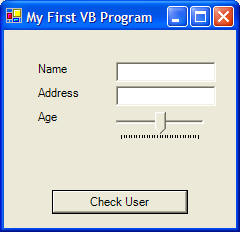
C# vs. VB .Net Comparison for the Hello World Program
Here is the code from a VB .Net program (auto-generated Form Designer Code is not shown):
 |
Download the VB .Net code by clicking on the Zip file. |
Public Class frmMain
Inherits System.Windows.Forms.Form
Private Sub btnCheck_Click(ByVal sender As System.Object, ByVal e As System.EventArgs) Handles btnCheck.Click
' check the text property of txtName
If txtName.Text = "Carman" Then
MsgBox("You rock!", vbOKOnly, "Name Validation")
Else
MsgBox("Error", vbCritical, "Name Validation")
End If
' check the value property of trkAge
If trkAge.Value < 5 Then
MsgBox("Youngin'", vbOKOnly, "Age Validation")
ElseIf trkAge.Value >= 5 And trkAge.Value < 18 Then
MsgBox("How's school going?", vbOKOnly, "Age Validation")
Else
MsgBox("Start planning your life...", vbOKOnly, "Age Validation")
End If
' reset our controls' properties
txtName.Text = ""
txtAddress.Text = ""
trkAge.Value = 0
End Sub
Private Sub frmMain_Load(ByVal sender As System.Object, ByVal e As System.EventArgs) Handles MyBase.Load
' this subroutine runs when your form first appears
' we will change some properties of our controls at startup
' to access a control's property, type the name of the control, then a period, and
' finally the property's name
txtName.Text = ""
txtAddress.Text = ""
trkAge.Value = 15
End Sub
End Class
Here is the code from the C# program (auto-generated Form Designer Code is not shown):
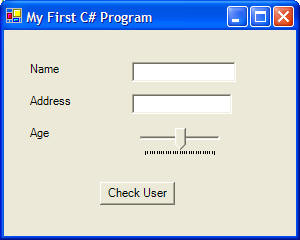
|
|
Download the C# code by clicking on the Zip file. |
using System;
using System.Drawing;
using System.Collections;
using System.ComponentModel;
using System.Windows.Forms;
using System.Data;
namespace HelloWorld_CSharp
{
/// <summary>
/// Summary description for Form1.
/// </summary>
public class Form1 : System.Windows.Forms.Form
{
private System.Windows.Forms.Label
lblName;
private System.Windows.Forms.Label
lblAddress;
private System.Windows.Forms.Label
lblAge;
private System.Windows.Forms.TextBox
txtName;
private System.Windows.Forms.TextBox
txtAddress;
private System.Windows.Forms.Button
btnCheck;
private System.Windows.Forms.TrackBar
trkAge;
/// <summary>
/// The main entry point for the
application.
/// </summary>
[STAThread]
static void Main()
{
Application.Run(new Form1());
}
private void btnCheck_Click(object
sender, System.EventArgs e)
{
// check the text property of txtName
if (txtName.Text
== "Carman")
{
MessageBox.Show("You rock!", "Name Validation", MessageBoxButtons.OK);
}
else
{
MessageBox.Show("Error", "Name Validation", MessageBoxButtons.OK);
}
// check the value property of trkAge
if (trkAge.Value
< 5)
{
MessageBox.Show("Youngin'", "Age Validation", MessageBoxButtons.OK);
}
else if (trkAge.Value
>= 5 && trkAge.Value < 18)
{
MessageBox.Show("How's school going?", "Age Validation", MessageBoxButtons.OK);
}
else
{
MessageBox.Show("Start planning your life...", "Age Validation",
MessageBoxButtons.OK);
}
// reset our controls' properties
txtName.Text
= "";
txtAddress.Text = "";
trkAge.Value
= 0;
}
private void Form1_Load(object
sender, System.EventArgs e)
{
// this subroutine runs when your form first appears
// we will
change some properties of our controls at startup
// to access
a control's property, type the name of the control, then a period, and
// finally
the property's name
txtName.Text
= "";
txtAddress.Text = "";
trkAge.Value
= 15;
}
}
}