ListView Control
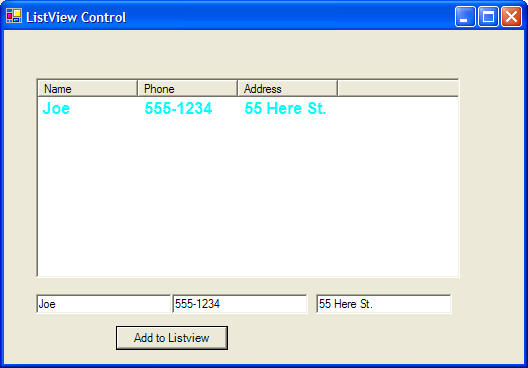
Here is the code for an example program that looks like this:
You can create multiple windows and easily move between them, hiding and showing each window.
 |
Download the code by clicking on the Zip file. |
Public Class Form1
Inherits System.Windows.Forms.Form
Private Sub Form1_Load(ByVal sender As System.Object, ByVal e As
System.EventArgs) Handles MyBase.Load
' change the view of the listview
control to show multiple details about an item (columns)
' the first column is the item for a row, other columns are
details about the first column
ListView1.View = View.Details
' add three columns
ListView1.Columns.Add("Name", 100, HorizontalAlignment.Left)
ListView1.Columns.Add("Phone", 100, HorizontalAlignment.Left)
ListView1.Columns.Add("Address", 100,
HorizontalAlignment.Left)
End Sub
Private Sub Button1_Click(ByVal sender As System.Object, ByVal e As
System.EventArgs) Handles Button1.Click
' add a new row where the first column
contains the main item
ListView1.Items.Add(TextBox1.Text)
' add details about that main item next (phone, address)
' we have to know which row contains
the new item, it should be the last row in the listview control
' this is just listview1.items.count -1
ListView1.Items(ListView1.Items.Count -
1).SubItems.Add(TextBox2.Text)
ListView1.Items(ListView1.Items.Count -
1).SubItems.Add(TextBox3.Text)
' change the font style, face, and color for this row
ListView1.Items(ListView1.Items.Count - 1).Font = New
Font("Arial", 12, FontStyle.Bold)
ListView1.Items(ListView1.Items.Count - 1).ForeColor =
Color.Aqua
End Sub
Private Sub ListView1_Click(ByVal sender As
Object, ByVal e As System.EventArgs) Handles ListView1.Click
Dim i As Integer
' make sure there are selected items
If ListView1.SelectedIndices.Count <> 0 Then
' step through
each selected item
For Each i In
ListView1.SelectedIndices
Dim s As
String
' output the column contents
s =
ListView1.Items(i).Text & " " & ListView1.Items(i).SubItems(1).Text & " " &
ListView1.Items(i).SubItems(2).Text
MessageBox.Show(s)
Next
End If
End Sub
End Class