Menus and Context Menus
Here is the code for an example program that looks like this:
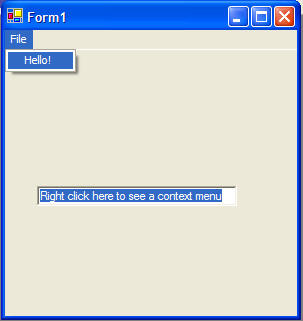
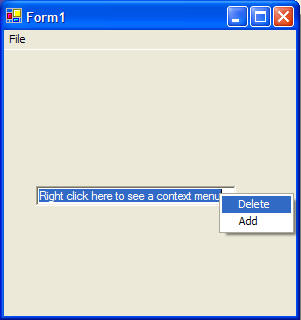
The left picture illustrates a regular menu. The right picture illustrates a context menu that appears when you right click on the textbox.
 |
Download the code by clicking on the Zip file. |
Public Class Form1
Inherits System.Windows.Forms.Form
' Creating Menus:
' -----------------
' to create the menu, drag a MainMenu object from the toolbox
on to your form
' you can then add things to this menu, just by typing in the
menu in the Form Designer
' Creating Context Menus:
' -------------------------
' to create a context menu, drag a ContextMenu object from
the toolbox on to your form
' you can then add things to this context menu, by selecting
it and typing in the menu in the Form Designer
'
' to link the context menu to an object, see the code below
in the form load sub routine
Private Sub MenuItem2_Click(ByVal sender As System.Object,
ByVal e As System.EventArgs) Handles MenuItem2.Click
MessageBox.Show("Hello!")
End Sub
Private Sub MenuItem3_Click(ByVal sender As System.Object,
ByVal e As System.EventArgs) Handles MenuItem3.Click
' code to
delete
MessageBox.Show("Delete!")
End Sub
Private Sub MenuItem4_Click(ByVal sender As System.Object,
ByVal e As System.EventArgs) Handles MenuItem4.Click
' code to add
MessageBox.Show("Add!")
End Sub
Private Sub Form1_Load(ByVal sender As System.Object, ByVal e
As System.EventArgs) Handles MyBase.Load
' add the context
menu to the textbox so when you right click on the textbox you'll see the
context menu
TextBox1.ContextMenu = ContextMenu1
End Sub
End Class