
Dynamic Queries and Dynamic Allocation of Controls
|
Download a sample VB program that creates a dynamic query and dynamically allocated controls. |
Instructions for Creating the Example:
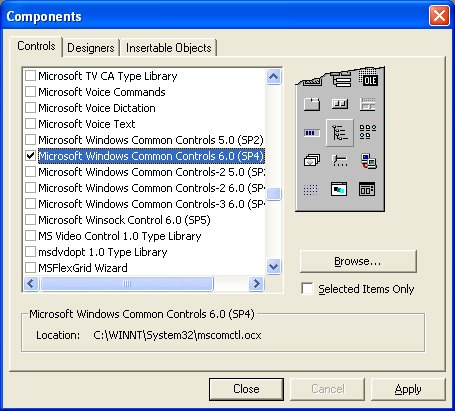
 .
Inside the first frame, draw four checkboxes
.
Inside the first frame, draw four checkboxes  .
Inside the second frame, draw one slider bar
.
Inside the second frame, draw one slider bar  .
.  and
inside of it draw one shape
and
inside of it draw one shape  .
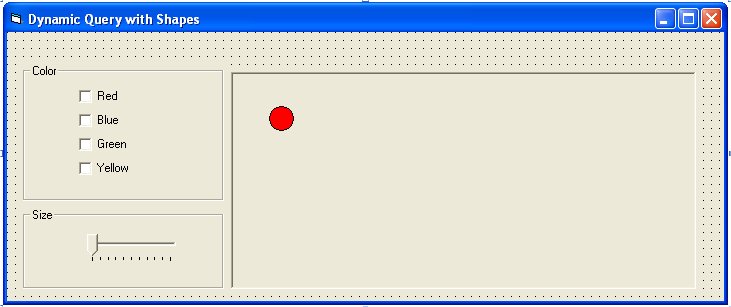
.
Private Type ShapeObj
Color As Integer
X As Integer
Y As Integer
Size As Integer
End Type
Dim ShapeArray(200) As ShapeObj
Private Sub Form_Load()
' prepare random number generation
Randomize
' we'll load 200 shapes in the picture box to run our dynamic query on
For i = 1 To 200
' load a new shape control
Load shpObject(i)
' make the shape visible
shpObject(i).Visible = True
' position it randomly in the picture box
shpObject(i).Left = Int(Rnd * picMap.Width)
shpObject(i).Top = Int(Rnd * picMap.Height)
' pick its color randomly
Dim Color As Integer
Color = Int(Rnd * 4)
Select Case Color
Case 0: shpObject(i).BackColor = vbRed
Case 1: shpObject(i).BackColor = vbBlue
Case 2: shpObject(i).BackColor = vbGreen
Case 3: shpObject(i).BackColor = vbYellow
End Select
' pick its size randomly
shpObject(i).Width = Int(Rnd * 200) + 50
shpObject(i).Height = shpObject(i).Width
' place shape information in our array of
objects
ShapeArray(i).Color = Color
ShapeArray(i).Size = shpObject(i).Width
ShapeArray(i).X = shpObject(i).Left
ShapeArray(i).Y = shpObject(i).Top
' we could just use our shpObject array but this will make
' it easy to extend the example to less trivial programs
Next i
' make sure every object should be visible
by checking all checkboxes and setting slider up
sliSize.Max = 250
sliSize.Value = sliSize.Max
chkRed.Value = 1
chkBlue.Value = 1
chkGreen.Value = 1
chkYellow.Value = 1
End Sub
Private Sub Form_Unload(Cancel As Integer)
For i = 1 To 200
Unload shpObject(i)
Next i
End Sub
Private Sub runQuery()
' the dynamic query
' check all shapes to see if they match the search criteria
For i = 1 To 200
' check the size of the shape
If ShapeArray(i).Size < sliSize.Value Then
' check the color of the shape
If (chkRed.Value = 0 And ShapeArray(i).Color = 0) Or _
(chkBlue.Value = 0 And ShapeArray(i).Color = 1) Or _
(chkGreen.Value = 0 And ShapeArray(i).Color = 2) Or _
(chkYellow.Value = 0 And ShapeArray(i).Color = 3) Then
shpObject(i).Visible = False
Else
shpObject(i).Visible = True
End If
Else
shpObject(i).Visible = False
End If
Next
End Sub
Private Sub chkBlue_Click()
runQuery
End Sub
Private Sub chkGreen_Click()
runQuery
End Sub
Private Sub chkRed_Click()
runQuery
End Sub
Private Sub chkYellow_Click()
runQuery
End Sub
Private Sub sliSize_Scroll()
runQuery
End Sub