Interaction Design
 Saul Greenberg
(instructor)
Saul Greenberg
(instructor)
Back to Student
Work Repository
| CPSC
581/599.81 Interaction Design |
|
|
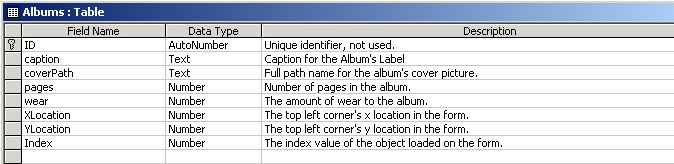
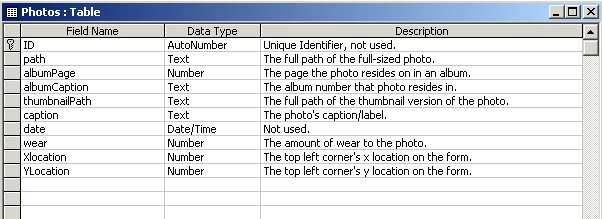
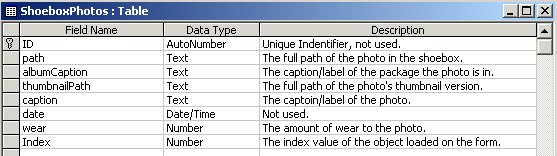
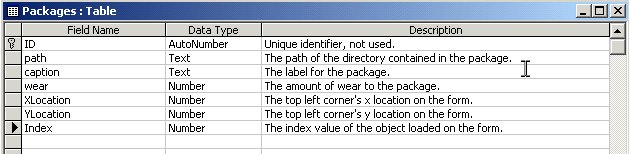
The Digital Album is a front-end to an Access database used for storing photos. Database queries, adds, and removes are transparent to the user, but are performed by the graphical user interface by using ADO.
The database consists of the following tables and fields:
The Digital Album combines the use of six ActiveX controls:
| Name | Description |
| IndexValue as Integer | The index of the object where control is contained in the main application. |
| CoverPicture as String | The full path of a picture used to tile as the background for the album. |
| Pages as Integer | The number of pages in the album. |
| Caption as String | The album's label. This is linked to the text in the textbox on the control. |
| Name | Description |
| removePicture(ByVal Path As String) | Removes a picture from the album's slideshow. Path is the full path of the picture to be removed. The actual remove is a remove from a GlabDictionary. |
| addPicture(ByVal Path As String) | Adds a picture to the album's slideshow. Path is the full path of the picture to be added. The actual add is an add to a GlabDictionary. |
| Name | Description |
| MouseDown(Button As Integer, Shift As Integer, X As Single, Y As Single) | Mapped to the user control. It raises the event MouseDown. |
| MouseMove(Button As Integer, Shift As Integer, X As Single, Y As Single) | Mapped to the user control. It raises the event MouseMove. |
| MouseUp(Button As Integer, Shift As Integer, X As Single, Y As Single) | Mapped to the user control. It raises the event MouseUp. |
| Click() | Mapped to the user control. It raises the event Click. |
| DblClick() | Mapped to the user control. It raises the event DblClick. |
| Change() | Mapped to the text box. If the textbox's text changes OR the caption property changes this event will fire. |
| Name | Description |
| ThumbnailPath as String | The full path of the thumbnail version of the picture. |
| Path as String | The full path of the picture. Setting this property will change the picture displayed in the picture box. |
| Wear as Integer | The amount of wear to the photo. A value greater than 10 causes the left corner of the picture to appear bent. |
| Caption as String | The picture's label. |
| Name | Description |
| MouseDown(Button As Integer, Shift As Integer, X As Single, Y As Single) | Mapped to the user control. It raises the event MouseDown. |
| MouseMove(Button As Integer, Shift As Integer, X As Single, Y As Single) | Mapped to the user control. It raises the event MouseMove. |
| MouseUp(Button As Integer, Shift As Integer, X As Single, Y As Single) | Mapped to the user control. It raises the event MouseUp. |
| Click() | Mapped to the user control. It raises the event Click. |
| DblClick() | Mapped to the user control. It raises the event DblClick. |
| Name | Description |
| CurrentPage as Integer | The value of the current page being viewed. One page is equal to both the lefthand side and the righthand side. This is used in calculating how many pages are to be represented to the left and right of the current page. |
| CoverPicture as String | The full path of a picture used to tile as the background for the album. |
| Pages as Integer | The number of pages in the album. This is used in calculating how many pages are to be represented to the left and right of the current page. |
| Name | Description |
| MouseDown(Button As Integer, Shift As Integer, X As Single, Y As Single) | Mapped to the user control. It raises the event MouseDown. |
| MouseMove(Button As Integer, Shift As Integer, X As Single, Y As Single) | Mapped to the user control. It raises the event MouseMove. |
| MouseUp(Button As Integer, Shift As Integer, X As Single, Y As Single) | Mapped to the user control. It raises the event MouseUp. |
| Click() | Mapped to the user control. It raises the event Click. |
| Name | Description |
| Wear as Integer | The amount of wear to the package. A value >=5 and <10 shows scratches in the upper left corner. A value >= 10 shows a folded bottom right corner as well. |
| Caption as String | The album's label. This is linked to the text in the textbox on the control. |
| Name | Description |
| removePicture(ByVal Path As String) | Removes a picture from the packages's slideshow. Path is the full path of the picture to be removed. The actual remove is a remove from a GlabDictionary. |
| addPicture(ByVal Path As String) | Adds a picture to the package's slideshow. Path is the full path of the picture to be added. The actual add is an add to a GlabDictionary. |
| Name | Description |
| MouseDown(Button As Integer, Shift As Integer, X As Single, Y As Single) | Mapped to the user control. It raises the event MouseDown. |
| MouseMove(Button As Integer, Shift As Integer, X As Single, Y As Single) | Mapped to the user control. It raises the event MouseMove. |
| MouseUp(Button As Integer, Shift As Integer, X As Single, Y As Single) | Mapped to the user control. It raises the event MouseUp. |
| Click() | Mapped to the user control. It raises the event Click. |
| DblClick() | Mapped to the user control. It raises the event DblClick. |
| Change() | Mapped to the text box. If the textbox's text changes OR the caption property changes this event will fire. |
| Name | Description |
| Amount as Integer | The amount of packages in the shoebox currently. For each value of amount, a rectangle is displayed representing the package. |
| Name | Description |
| Click() | Mapped to the user control. It raises the event Click. |
| DblClick() | Mapped to the user control. It raises the event DblClick. |
| Name | Description |
| removePicture(ByVal Path As String) | Removes a picture from slideshow. Path is the full path of the picture to be removed. The actual remove is a remove from a GlabDictionary. |
| addPicture(ByVal Path As String) | Adds a picture to the slideshow. Path is the full path of the picture to be added. The actual add is an add to a GlabDictionary. |
| Name | Description |
| MouseDown(Button As Integer, Shift As Integer, X As Single, Y As Single) | Mapped to the user control. It raises the event MouseDown. |
| MouseMove(Button As Integer, Shift As Integer, X As Single, Y As Single) | Mapped to the user control. It raises the event MouseMove. |
| MouseUp(Button As Integer, Shift As Integer, X As Single, Y As Single) | Mapped to the user control. It raises the event MouseUp. |